How Bump works: peer-to-peer Internet sharing between nearby phones
Bump is an Android app that lets one phone share its mobile data or Wi-Fi with a nearby phone, and pays the person sharing for the data that flows through. This page explains how the app does that, in enough detail for an engineer to check the claims. For the short answers, see the FAQ.
The short version
- A phone that is sharing announces itself over Bluetooth Low Energy (BLE). Phones nearby pick up the announcement and show it on a list and a coverage map.
- When you choose a sharer, your phone opens a Wi-Fi Direct connection to theirs. Data flows over that link, not over the Internet.
- Before any of your traffic moves, your phone opens an encrypted OpenVPN tunnel to a Bump server. The sharer’s phone forwards the tunnel’s packets but cannot read them.
- The sharer approves you and sets a data limit. You pay per megabyte with Bump credits. They earn reward points for the same megabytes.
Finding a sharer: Bluetooth and the coverage map
A phone that is sharing advertises over BLE. Everything the other phone needs to connect is in the advertisement itself: whether the sharer is on mobile data, Wi-Fi or both, whether it is a hotspot or a relay, and the Wi-Fi Direct network name and passphrase. Phones that support Bluetooth 5 extended advertising also include the sharer’s username, a speed estimate and the price per megabyte.
Phones looking for Internet advertise too, with a flag that says “I need data”. That is how a sharer’s phone can tell that people nearby want a connection before anyone taps anything.
Your phone scans continuously while the app is open and drops any sharer it has not heard from for five seconds, so the list you see is live. Bluetooth range is line of sight and short: the same room, building, plaza or bus. Two phones can find each other only when each is inside the other’s range.
Bump is not city-wide Wi-Fi, yet. We aim to get there by growing coverage rather than range. The coverage map tells us where people are looking for a connection and nobody is sharing. Our bounty program offers extra rewards to sharers who show up in a specific cell of a city for a set time window, verified by the same location reports that feed the map, so that high-demand areas get as close to blanket coverage as we can manage.
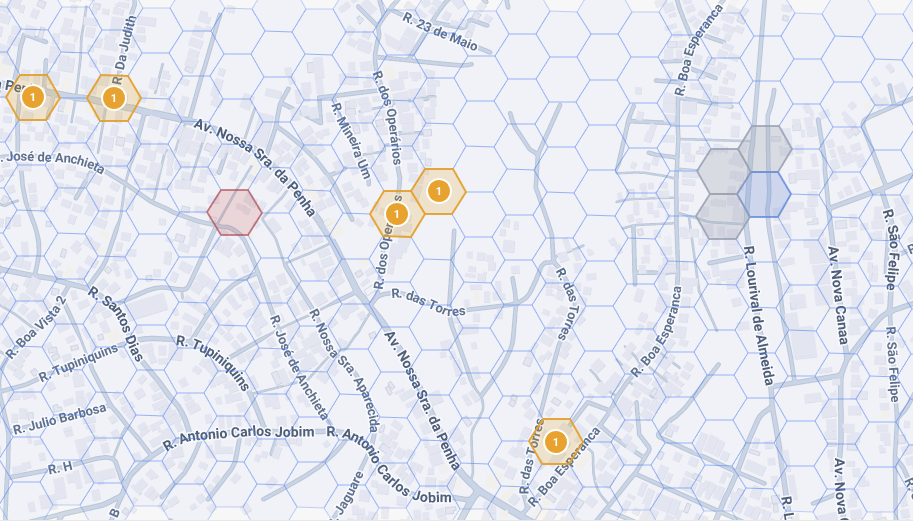
The coverage map is built from location reports that phones attach, if location is enabled, to their session and scanning records. Our backend aggregates them into one entry per device. The app asks for devices seen in the last 30 minutes within about a kilometre and draws each as a small circle, blue for supply and red for demand, refreshing every ten seconds. Entries older than 24 hours are deleted.
Connecting phone to phone: Wi-Fi Direct
When you choose a sharer, two links are opened at once.
The first is a BLE L2CAP channel. It is up within a second or two and carries a few hundred kilobits per second. It is enough to complete the handshake, fetch the VPN credentials and start the tunnel while the faster link is still coming up.
The second is Wi-Fi Direct. The sharer’s phone is the group owner of a Wi-Fi Direct group. Your phone joins it as an ordinary Wi-Fi station using the network name and passphrase it read from the BLE advertisement, through Android’s network suggestion API. It then finds the sharer’s address with a UDP multicast on the link. This takes five to ten seconds and carries tens of megabits per second. Once it is up, the tunnel is restarted over it and the session continues.
Bump does not use the phone’s ordinary hotspot. Android’s hotspot APIs either need hardware that can be a station and an access point at once or do not let an app manage the connection, so Bump runs its own Wi-Fi Direct group instead. That is also why the sharer’s phone stays connected to its own Wi-Fi or mobile data while sharing.
The passphrase travels in a Bluetooth advertisement that anyone in range can read. That is deliberate. The Wi-Fi link only ever carries encrypted tunnel traffic, and nobody gets Internet through it until the sharer has approved them, so the passphrase does not protect anything on its own.
The tunnel: what the sharer can and cannot see
Your phone runs the OpenVPN 3 core library. It creates an Android VPN interface that captures all of your phone’s traffic, including DNS, and sends it into the tunnel. The tunnel’s packets go to a local proxy on your phone, which wraps each one in a small header with the address of the Bump VPN server and sends it over the Wi-Fi Direct link (or the BLE link while Wi-Fi is still connecting). The sharer’s phone reads the header, opens a plain UDP socket to that server and forwards the packet. Replies come back the same way.
The sharer’s phone never has a key to the tunnel. Credentials work like this:
- Your phone generates its own key pair and a certificate signing request. The private key never leaves your phone.
- It signs a claim containing your account ID, device ID and the request, and sends it to the sharer.
- The sharer’s phone relays the claim unchanged to the VPN server and relays the answer back byte for byte.
- The server checks the claim with Bump’s directory service and signs the certificate, valid for 30 days.
- Your phone verifies the reply against a public key built into the app, checks the certificate matches its own key and the server it expects, and only then connects.
So the sharer can see:
- The address of the Bump VPN server you are using.
- How many bytes you sent and received, and when. This is what they are paid for.
- Your username and device identifier.
The sharer cannot see:
- Which sites, apps or servers you are talking to.
- Your DNS lookups, which go inside the tunnel.
- The content of anything you send or receive.
Your traffic exits to the Internet from the Bump server, not from the sharer’s connection, so nothing you do appears to come from their IP address. The Bump server is where the tunnel ends, so it is the point that can see your traffic, exactly as your ISP or any VPN provider can. We do not record which sites or apps you access. We keep connection records (which device, which server, when, how much data, which exit IP) for 12 months because Brazil’s Marco Civil da Internet requires it, and every staff access to those records is itself logged. The privacy policy has the details.
Who approves, and data limits
Nothing flows until the sharer says yes. When you ask to connect, the sharer gets a notification naming you and a dialog where they approve or block the request and set a data limit for you. The limit can be any amount, or unlimited.
The sharer’s phone counts every byte in each direction per connected person. The app shows each person’s usage against their limit, and lets the sharer raise the limit or disconnect them at any time. When a limit is reached the connection is closed with a reason your phone shows. The same happens if your credits run out. The sharer can also stop sharing altogether, which disconnects everyone.
Credits and reward points
Both phones report their byte counts to Bump’s backend during the session. The backend charges the person using the connection per megabyte, at the sharer’s rate, in credits. It awards the sharer reward points for the same megabytes. Credits are bought in the app and never expire. Reward points are converted to money through Pix in Brazil and Bre-B in Colombia. The rates come from a server-side configuration, not from the app, so they can change without an update. The FAQ has the current prices and payout details.
Passing it on: the chain
A phone that is connected through Bump can also share what it has with the next phone. We call this passing it on, or the chain. It reaches places the first sharer’s Wi-Fi does not: the back of a market, a basement lecture hall, the far end of a bus.
Technically the relay phone runs both roles at once: it is a client of the phone upstream and a sharer to the phone downstream. Each packet from your phone carries a header naming its source, so the relay forwards it, still encrypted, into its own link upstream. The tunnel is the same one described above and still ends at the Bump server, so a relay can read no more of your traffic than a sharer can. Approval and credentials come from the phone at the top of the chain, the one with real Internet.
Speed along the chain is set by the phone doing the relaying, not by how many hops there are. A relay is a Wi-Fi client of the phone upstream and the group owner of its own Wi-Fi Direct group for the phone downstream, both on the same radio, so it is the bottleneck, and a cheap one especially. In our measurements a low-end phone sharing a mobile connection gives around 50 Mbps, and a phone that is itself on Wi-Fi and sharing that Wi-Fi can drop to 5 to 10 Mbps. Adding hops beyond that does not noticeably cut throughput, but each hop adds latency. Expect video to work and calls and games to feel the delay first. There is no hop limit in the software, and we have run chains of ten hops in testing. The practical limit is how many phones are around, not the hop count. Each phone can serve about four or five directly connected phones, depending on the handset, so a chain spreads out as a tree rather than a single line.
Passing it on is in the app behind a setting and is off by default while we finish testing it across many devices. Phones with it on and phones with it off form separate networks and do not see each other, which is why it will switch on for everyone at once rather than gradually.
Chat with no Internet at all
Bump includes a chat that works when nobody nearby has Internet. Messages travel over BLE directly when the other person is in range. When they are not, the message waits in a queue on your phone. Each time your phone meets another Bump phone, the two swap queued messages and delivery receipts, so a message can hop through several phones before it reaches its recipient, and the receipt makes its way back the same way. This is delay-tolerant networking: nothing is guaranteed to arrive quickly, but it keeps moving as long as people move.
Messages live for 72 hours. A phone holds up to 100 of its own queued messages and carries up to 500 for other people. Every message is encrypted for the recipient’s devices with an X25519 key exchange and authenticated encryption, so the phones that carry it cannot read it. Each device has its own key pair and signs a claim saying which account it belongs to, and the app publishes that claim so other phones can check it when they have Internet, and trust it on first use when they do not. If any phone with Internet is available, the app can also deliver through Bump’s servers, so a message never has to wait for a physical meeting when it does not need to.
Limits worth knowing
- Range. Bluetooth and Wi-Fi Direct reach the same room, building, plaza or bus. If you can see the sharer, you are almost certainly in range.
- Android only. The app relies on Android’s BLE advertising and Wi-Fi Direct APIs. The app needs Android 11 or later.
- Battery. Sharing runs a Wi-Fi Direct group and a BLE advertiser, so it uses more battery than an idle phone. Using a connection costs about the same as any Wi-Fi.
- Your carrier. Sharing is ordinary tethering from your carrier’s point of view. Some plans sold as unlimited cap tethering separately.
Questions this page does not answer are probably in the FAQ. The app is free on Google Play.